
Introduction
Ultra-wideband, usually shortened to UWB, is one of the least visible but most interesting radios inside modern smartphones. It does not make your internet faster, replace 5G, or improve Bluetooth audio. Instead, UWB gives a phone something more spatial: the ability to understand where another compatible device is with very fine short-range accuracy. That is why UWB on smartphones is closely tied to precision finding, digital car keys, smart locks, hands-free access, and future location-aware experiences.
Most phone features are about communication. Wi-Fi moves data, cellular networks connect you to towers, NFC handles very close tap interactions, and Bluetooth keeps accessories paired. UWB is different because its core strength is precise ranging. A UWB-enabled phone can measure distance, direction, and movement relative to another UWB device, often with far more accuracy than Bluetooth signal strength or GPS can provide indoors.
This makes UWB especially useful in the final few meters of an interaction. A broad device-finding network may tell you that your keys are somewhere in the house, but UWB can guide you toward the couch cushion with an arrow, distance estimate, and directional feedback. A car app may know you are near your vehicle through Bluetooth, but UWB can help confirm whether your phone is outside the driver door, inside the cabin, or walking away. That last part is what makes UWB valuable: it is not just wireless communication, it is short-range intent detection.
What UWB Means on a Smartphone
UWB stands for ultra-wideband, a short-range wireless technology that uses very wide radio channels and extremely short pulses. Instead of focusing on high data throughput, UWB focuses on measuring time very precisely. When two UWB devices communicate, they can calculate how long a signal takes to travel between them. Because radio waves move at a known speed, tiny differences in timing can be converted into distance.
The FiRa Consortium, one of the main industry groups behind UWB interoperability, describes this as time-of-flight ranging. In simple terms, your phone and the accessory exchange signals, measure round-trip timing, and estimate where each device is. The IEEE 802.15.4z standard also supports precision ranging modes, which is why UWB is widely discussed in access control, smart keys, and secure short-range positioning.
UWB Is Not Another Internet Connection
A common misunderstanding is that UWB is a faster version of Bluetooth or a new type of Wi-Fi. It is not. While UWB can send small amounts of data, its practical smartphone value is location awareness. If you are choosing between phones, UWB should not be judged like a cellular modem, Wi-Fi chipset, or storage speed feature. It is better to think of it as a spatial sensor that helps your phone understand nearby compatible objects.
That spatial role explains why UWB often works alongside other technologies. Bluetooth LE may discover that a nearby tracker, car, lock, or device is present. NFC may provide a fallback tap interaction. Wi-Fi or cellular may move large data or sync cloud information. UWB steps in when the system needs to know where the phone is in relation to something else.
Distance, Direction, and Movement
Basic ranging tells a phone how far away another device is. More advanced UWB systems can also estimate direction, often using antenna arrays and angle-of-arrival techniques. This is what makes precision finding feel different from a simple hot-and-cold signal meter. Instead of saying that a tag is nearby, the phone can display an arrow, distance, and sometimes haptic feedback as you move closer.
UWB can also help determine motion and intent. Are you walking toward the car or past it? Is the phone outside the home door or already inside? Is a tracker across the room or directly behind you? These questions are hard for GPS indoors and unreliable with Bluetooth signal strength alone. UWB is designed for exactly this kind of short-range, high-confidence positioning.
How UWB Differs From Bluetooth, NFC, Wi-Fi, and GPS
UWB makes more sense when compared with the wireless features people already know. Each technology has a role, and the best smartphone experiences often combine several of them rather than relying on one radio alone.
- Bluetooth LE: Good for low-power discovery, accessory pairing, beacons, and background presence. It can estimate proximity, but signal strength is affected by walls, pockets, bodies, and reflections.
- NFC: Excellent for deliberate tap interactions at very close range. It is simple and secure for many uses, but it requires the phone to be almost touching the reader.
- Wi-Fi: Designed for data networking. Wi-Fi location can be useful in some environments, but it is not the same as centimeter-level short-range ranging between two personal devices.
- GPS: Useful outdoors for maps and navigation. Indoors, underground, or in dense city environments, GPS may be unavailable or imprecise.
- UWB: Built for precise short-range distance and direction between compatible devices, especially indoors and around objects.
Why Bluetooth Alone Is Not Enough
Bluetooth signal strength can tell a system that something is probably close, but it is not a precise ruler. A phone in a back pocket may appear farther away than it really is. A device behind a wall can look similar to a device in the same room. Metal, water, people, and furniture can all change the signal. That is acceptable for many accessories, but it is not ideal when the system must decide whether to unlock a car, start an engine, open a door, or point you to a lost item.
UWB improves that final decision because it measures time-of-flight rather than simply guessing distance from signal strength. It still has limitations, but it is much better suited to fine-grained proximity and direction.
Why NFC Still Matters
UWB does not make NFC obsolete. In fact, digital keys often use multiple layers. NFC is useful as a reliable fallback because a tap is intentional and works at extremely close range. If passive UWB entry fails, a phone or watch may still unlock a compatible car or door through a tap-style interaction, depending on the system. NFC is also widely understood by users: touch the phone to the reader and the action happens.
The difference is convenience and context. NFC asks you to make a physical gesture. UWB can support experiences where the phone stays in your pocket because the system can verify that the right device is in the right place.
Precision Finding: The Most Familiar UWB Smartphone Feature
Precision finding is the feature many people notice first. Attach a compatible UWB tracker to keys, a bag, a wallet, or another everyday item, and a supported smartphone can guide you toward it when you are nearby. The phone may show distance, direction, visual arrows, sound prompts, and vibration feedback. This is more useful than a basic ring command when the item is hidden under fabric, behind furniture, or mixed into clutter.
The important distinction is that UWB usually solves the last-room problem. A larger finding network may help locate an item across town or tell you it was last seen at home. UWB helps once you are close enough for the phone and tag to range directly. That makes the experience feel immediate: turn left, move forward, check behind the cushion, or look near the desk.
How Precision Finding Works in Real Life
When you start a precision finding session, your phone first needs to communicate with the tag or device. Bluetooth may help establish contact, then UWB ranging begins. As you walk, the phone repeatedly updates distance and direction. The software turns those readings into a user interface that ordinary people can follow.
In practice, precision finding is most helpful for items that are nearby but hidden. For example:
- Keys buried under laundry or inside a bag.
- A wallet left in a jacket pocket.
- Earbuds or a charging case somewhere in one room.
- A remote control slipped between sofa cushions.
- A backpack placed in a crowded office, classroom, or hotel room.
UWB is not magic. If the tracker battery is dead, the item is far outside range, or the tag does not support UWB, precision finding will not behave the same way. Some ecosystems also reserve directional finding for specific phone and accessory combinations. Always check both sides of the feature: the smartphone must have UWB hardware, and the tag or device must support compatible UWB ranging.
Walls, Bodies, and Real-World Accuracy
UWB is strong indoors, but physical conditions still matter. Human bodies absorb radio energy. Metal surfaces can reflect signals. A tag inside a dense bag may be harder to range than one sitting on a table. Walls and floors can reduce reliability, and the best directional guidance often appears once you are in the same room or close to it.
That is why precision finding should be seen as a close-range guide, not a universal object radar. It is excellent at improving the final search. It is not designed to show every lost item in a building from hundreds of feet away.
Digital Car Keys and Passive Entry
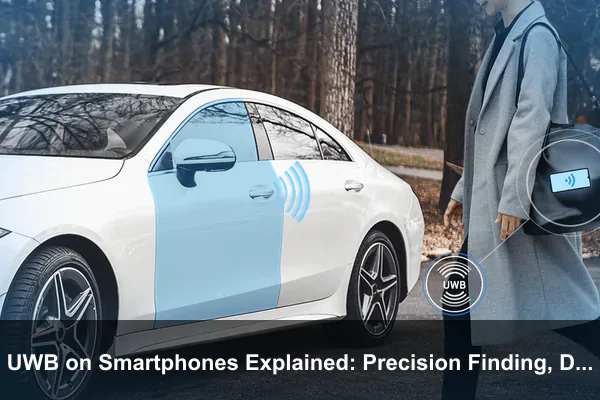
Digital car keys are where UWB becomes more than convenient. A phone-based car key needs to answer a security-sensitive question: is the authorized device truly near the vehicle, and is it in the right place to unlock or start? Bluetooth can help the car and phone discover each other, but Bluetooth alone is vulnerable to uncertainty about distance. UWB helps because it can support secure ranging and location checks.
The Car Connectivity Consortium describes digital key certification around interoperability, NFC tap access, Bluetooth LE proximity communication, and UWB communication for determining whether the mobile device is inside the vehicle or close outside it. That layered approach matters because cars need both convenience and strong resistance to accidental or malicious triggering.
Passive Entry Versus Tap-to-Unlock
There are two broad styles of phone-based car access. With tap-to-unlock, you hold the phone or watch near a door handle or reader, then place it near an interior reader to start. With passive entry, the vehicle unlocks as you approach, may start when the phone is inside, and locks again when you walk away. Passive entry is the experience most people associate with a premium digital car key, and it is where UWB can be especially valuable.
Official phone platforms describe these differences clearly. Apple Wallet car keys can support proximity, passive entry, and remote functions depending on the vehicle. Android digital car key explains that compatible systems may use Bluetooth and UWB, or NFC, and that key information is stored securely on device hardware. Google Pixel support also notes that passive entry and remote commands depend on vehicle and device compatibility.
Why UWB Helps Against Relay Problems
Traditional keyless car systems have faced relay attacks, where criminals try to extend the signal from a legitimate key inside a house to a vehicle outside. UWB is not a complete security guarantee by itself, but secure ranging makes this kind of trick harder because the car is not only checking that a credential exists. It is also checking whether the authorized device appears to be physically located where it should be.
A well-designed digital key system may combine several protections:
- Secure element or hardware-backed storage for the key credential.
- Bluetooth LE to establish nearby communication.
- UWB secure ranging to verify distance and position.
- NFC fallback for deliberate close-range access.
- Biometric or screen-lock policies for sharing, deletion, or sensitive actions.
For users, the practical benefit is simple: the car can behave more naturally without requiring the phone to be removed from a pocket or bag. For automakers, the challenge is making that convenience reliable without opening the door to false unlocks or weak authentication.
Compatibility Is Still Fragmented
Digital car keys are not universal. A phone may support UWB, but the car may support only NFC. A car may support passive entry, but only with certain phone brands, regions, wallet apps, or software versions. A watch may support some key functions while a phone model lacks the required hardware. Automaker software, regional regulations, and wallet platform support all matter.
Before buying a phone specifically for UWB digital car keys, verify four things: the exact phone model, the exact vehicle trim and model year, the wallet platform you plan to use, and whether passive entry is supported rather than only tap-to-unlock. The phrase digital key on a spec sheet does not always mean UWB passive entry.
Everyday Uses Beyond Trackers and Cars
UWB on smartphones is often introduced through item trackers and digital car keys, but the broader idea is more interesting. A phone that understands precise nearby location can become a trusted controller for spaces, devices, and services. The technology is still maturing, yet several everyday uses are already practical or clearly emerging.
Smart Home Access
Smart locks, garage doors, gates, and home security systems can benefit from UWB because they need to know not only who is nearby, but where that person is. A lock should not open because your phone is inside the house near the door. A garage system should not trigger just because you are walking past the wall. UWB can help define intent zones: outside the door, approaching the driveway, inside the entryway, or leaving the property.
This does not mean every smart lock needs UWB. Many homes are served well by keypads, NFC, Bluetooth, or app controls. UWB becomes valuable when the goal is passive, low-friction access with fewer false triggers.
Device Handoff and Nearby Controls
Some smartphone ecosystems already use nearby awareness to make device handoff feel smoother. UWB can improve these experiences by helping determine which device you are pointing at or standing near. A phone could offer media controls for the speaker in front of you, transfer playback to the TV you are facing, or prioritize the laptop on your desk instead of another device across the room.
It is important to separate positioning from data transfer. UWB may help select the correct target, but the actual file, stream, or session may move over Wi-Fi, Bluetooth, or the internet. UWB is the spatial cue, not necessarily the delivery pipe.
Workplaces, Hotels, and Shared Spaces
In offices, hospitals, warehouses, campuses, and hotels, UWB-enabled phones could support more accurate indoor wayfinding, equipment location, room access, and asset tracking. A visitor could be guided to a meeting room without relying on weak GPS. Staff could locate a shared tool or device more quickly. A hotel key could distinguish between standing outside the room door and walking down the hallway.
These uses require careful privacy design. Precise indoor location is sensitive. Organizations need clear consent, visible controls, limited retention, and strong security. The most useful UWB deployments will be the ones that solve a real friction point without turning every phone into a constant tracking badge.
Accessibility and Context-Aware Assistance
UWB can also support accessibility features. Directional finding may help someone locate a misplaced essential item. Indoor guidance could help users identify the correct doorway, counter, or service point. Context-aware controls could surface the right device interface when a user is near it, reducing the need to navigate menus.
The best accessibility uses will depend on thoughtful interface design. Distance and direction data are only helpful when translated into clear audio, haptic, visual, or assistive prompts.
How to Know Whether Your Phone Has UWB
UWB support is model-specific. It is not guaranteed just because a phone is expensive, new, or part of a premium brand. Some flagship models include UWB, while smaller, budget, regional, or value-focused versions omit it. Some manufacturers include UWB only in Pro, Ultra, Plus, or Fold models. Others may support it in select generations but not all variants.
Look for terms such as UWB, Ultra Wideband, U1, U2, IEEE 802.15.4z, or precision finding in the official specifications. Be careful with retailer listings, because they sometimes copy generic feature text across multiple models.
Compatibility Checklist
Use this checklist before buying a phone, tracker, lock, or car with UWB in mind:
- Confirm the exact smartphone model and regional variant include UWB hardware.
- Check whether UWB is enabled in your country or region, because radio rules can affect availability.
- Verify the accessory, tag, car, lock, or device also supports compatible UWB.
- Check whether the feature requires a specific wallet app, manufacturer app, operating system version, or account.
- Read the fine print for passive entry, precision finding, sharing, family access, and fallback options.
- Make sure you understand what happens when the phone battery is low, the device is lost, or the internet is unavailable.
Settings and Permissions
On many phones, UWB may appear in settings under connections, nearby devices, location, or advanced wireless options. Some systems enable it automatically only when a supported feature starts. App developers may also need platform permissions to access ranging. On Android, newer platform documentation describes a standardized ranging interface and a dedicated ranging permission for supported use cases. For ordinary users, the key point is that UWB access is usually controlled by the operating system rather than left open to every app without oversight.
If a UWB feature is not working, do not assume the radio is broken. The cause may be unsupported hardware, a disabled setting, regional restriction, outdated vehicle software, accessory firmware, missing wallet support, or a compatibility limit between ecosystems.
Privacy, Security, and Battery Considerations
Because UWB deals with precise nearby location, privacy matters. UWB is not the same as GPS and does not automatically tell apps where you are on a map. However, it can reveal your position relative to nearby devices, doors, cars, tags, or access points. That information can be sensitive, especially in homes, workplaces, and shared spaces.
Good UWB implementations should be permissioned, limited to clear use cases, and paired with user controls. You should be able to remove a digital key, stop sharing access, disable a tracker, revoke app permissions, or turn off nearby features when needed. When UWB is used for a car key or access credential, the security of the wallet, secure element, account recovery, and sharing flow matters as much as the radio itself.
Battery Impact
UWB is designed for short bursts of precise ranging, not continuous high-bandwidth communication. In normal use, the battery impact is usually tied to how often a feature runs. Precision finding sessions, passive car key checks, and background ranging can use power, but they are not the same as streaming video or running GPS navigation for hours. Still, phones may restrict ranging when battery, performance, or thermal conditions require it.
For users, the practical rule is simple: leave UWB enabled if you use features that depend on it, such as precision finding or passive digital keys. If you never use UWB accessories, turning it off may reduce background activity slightly, but it will also disable the experiences that make the hardware worthwhile.
Security Is a System, Not a Checkbox
A phone with UWB is not automatically secure in every context. Secure ranging, credential storage, app permissions, wallet policies, device lock settings, automaker implementation, and cloud account protection all contribute to the final result. A weak recovery process or poorly designed sharing feature can undermine strong radio technology.
When evaluating UWB digital keys or smart access systems, look for clear controls: remove key, suspend access, require authentication for sensitive actions, share with expiration, see who has access, and recover safely when a device is lost.
Should UWB Influence Your Next Smartphone Purchase?
UWB should influence your next phone purchase if you already use, or plan to use, features that clearly depend on it. If you own a compatible car with passive digital key support, use UWB trackers, rely on precision finding, or want smart home access that recognizes exact approach and location, UWB is worth prioritizing. It is one of those features that feels minor until it becomes part of a daily routine.
If you do not use compatible accessories, UWB may not matter yet. A phone without UWB can still be excellent. It can still use Bluetooth accessories, NFC payments, GPS navigation, Wi-Fi, cellular, and app-based smart home controls. The difference is that it may miss the most precise nearby-location experiences.
The best way to think about UWB is as a future-facing convenience and security layer. It adds value when the surrounding ecosystem supports it. On its own, a UWB chip does nothing visible. Paired with the right tag, vehicle, lock, watch, or app, it can make the phone behave less like a remote control and more like a context-aware key.
Conclusion
UWB on smartphones is best understood as precision short-range location technology. It does not compete with 5G for internet access, Wi-Fi for networking, NFC for tap interactions, or Bluetooth for accessories. Instead, it improves the moments when your phone needs to know exactly where something is nearby.
That is why UWB is central to precision finding, digital car keys, passive entry, smart locks, device handoff, indoor location, and future context-aware experiences. Its value comes from distance, direction, and intent. A phone can find an item in the last few meters, a car can verify that a key is really near the driver door, and a smart space can respond more accurately to your presence.
For most people, UWB is not a must-have specification in isolation. It becomes important when your devices, accessories, car, and apps support it together. If you care about precision finding, hands-free digital keys, and smarter nearby interactions, UWB is one of the most meaningful smartphone technologies to watch.
