
Introduction: Why Screen Comfort Should Be Part of Your Phone Buying Decision
Smartphone reviews often focus on brightness, refresh rate, camera processing, chipset speed, and battery life. Those features matter, but they do not tell the whole story of how a phone feels after thirty minutes of reading, messaging, editing photos, or scrolling at night. For some people, the most important display specification is not peak brightness or resolution. It is how the screen controls brightness at low levels, especially when it uses PWM dimming.
PWM, or pulse width modulation, is a common display-dimming method that rapidly switches pixels or backlight output on and off to create the appearance of lower brightness. Many people never notice it. Others may experience tired eyes, headaches, dry-eye discomfort, nausea, or a strange sense that the screen feels harsh even when it looks sharp and colorful. The difficult part is that two phones can both use OLED panels, both look excellent in a store, and still feel very different after long use.
This guide takes a buyer-focused angle. Instead of simply explaining what flicker is, it shows you how to pick a smartphone display that is easier on your eyes before you spend money. You will learn which specifications matter, how to interpret PWM frequency claims, why brightness behavior matters as much as the number itself, what to test in person, and how to balance comfort with other display features like LTPO refresh rates, outdoor brightness, and color accuracy.
The goal is not to make every shopper afraid of OLED or PWM. The goal is to give you a practical framework. A more comfortable smartphone screen is not always the most expensive screen, the brightest screen, or the one with the most dramatic spec sheet. It is the screen whose dimming behavior matches your eyes, your lighting habits, and the way you actually use your phone.
What PWM Dimming Means When You Are Choosing a Smartphone
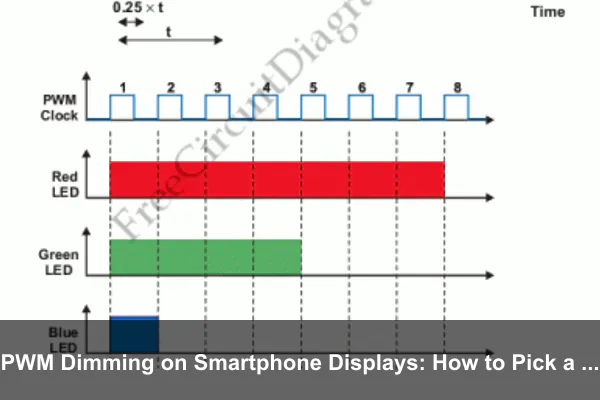
Pulse width modulation changes perceived brightness by varying how long the display is on during each flicker cycle. At higher brightness, the screen may stay on for a larger portion of each cycle. At lower brightness, it may spend more of each cycle off. Your eyes may not consciously see the flicker, but the visual system can still respond to the rapid changes in light output.
On smartphones, PWM dimming is most often discussed with OLED displays because OLED pixels emit their own light and many panels regulate low brightness with flicker. LCD phones can also flicker depending on backlight design, but modern premium phones are heavily OLED-focused, so PWM has become a bigger buying issue.
PWM frequency is important, but it is not the only factor
The number most commonly advertised is PWM frequency, measured in hertz. A phone with 240 Hz PWM is cycling far fewer times per second than one advertising 1,920 Hz, 2,160 Hz, 3,840 Hz, or higher. In general, a higher PWM frequency can be easier for sensitive users because each pulse happens more quickly.
However, frequency alone does not guarantee comfort. The shape of the flicker waveform, the depth of modulation, the brightness level where PWM begins, and whether the phone combines DC-like dimming with PWM all matter. A high-frequency panel with aggressive modulation may still bother some users, while a lower-frequency implementation may be tolerable for others in bright rooms.
Modulation depth changes how intense the flicker feels
Modulation depth describes how far the display output swings between brighter and darker parts of the cycle. A screen that drops close to black during each pulse can feel more intense than one with a shallower light variation, even if the frequency number looks acceptable. Unfortunately, modulation depth is rarely listed on retail product pages, which is why independent measurements and hands-on testing are valuable.
Low brightness is where problems often appear
Many PWM-sensitive users report the most discomfort at low brightness, especially in dark rooms. This is also when people tend to read in bed, reply to messages, watch videos, or use navigation in a car at night. A phone that feels fine at 70% brightness under store lighting may feel irritating at 10% brightness in a quiet room.
The Unique Buying Angle: Match the Screen to Your Real Usage Pattern
A screen that is easier on your eyes is not a universal product category. It depends on when, where, and how you use your smartphone. Before comparing models, define your own display comfort profile. This helps you avoid buying based only on impressive marketing language.
If you use your phone mostly outdoors
Outdoor users often prioritize high brightness, anti-reflective glass, and automatic brightness performance. PWM may still matter, but you may spend more time at medium to high brightness where some phones use less aggressive flicker behavior. For this usage pattern, look for:
- Strong sustained brightness, not just peak brightness for small HDR highlights.
- Good auto-brightness tuning so the phone does not constantly dip into uncomfortable low levels.
- Low reflectivity, because a less reflective screen can remain readable without forcing maximum brightness.
- Independent PWM tests at 25%, 50%, and 75% brightness, not just minimum brightness.
If you read at night or in dim rooms
Night reading is the hardest case for many PWM-sensitive users. You are likely to reduce brightness, increase viewing time, and hold the screen close to your face. In this scenario, your buying priorities should shift toward comfort controls and low-brightness behavior:
- High PWM frequency at low brightness, preferably confirmed by independent measurements.
- DC dimming or anti-flicker mode, if available and well implemented.
- Extra dim controls that reduce visual intensity without forcing the panel into harsher flicker behavior.
- Warm color temperature and reduced blue light options, which do not solve PWM but may improve overall comfort.
If you are a heavy social media or messaging user
Frequent short sessions can still add up to hours of screen exposure per day. Social feeds combine white backgrounds, motion, rapid scrolling, and changing brightness in videos. For this user profile, evaluate both flicker and motion comfort:
- Stable adaptive refresh rate behavior so the screen does not feel jumpy between apps.
- Comfortable white background rendering, especially in messaging and browser apps.
- Dark mode quality, including whether text remains clear without blooming or smearing.
- Display settings that are easy to access, because comfort often requires small adjustments through the day.
How to Read PWM Specs Without Getting Misled
Manufacturers increasingly promote high-frequency PWM dimming because buyers are becoming aware of flicker. That is a positive trend, but it also means shoppers need to read claims carefully. A single headline number may not describe the entire display behavior.
Check when the advertised PWM frequency applies
Some phones advertise very high-frequency PWM dimming, but that mode may apply only below a certain brightness level, only in a specific display mode, or only after enabling an eye comfort setting. Other phones may use one dimming method at higher brightness and another at lower brightness. When researching a model, look for measurements across multiple brightness levels, not just a single frequency claim.
A useful review will usually test several points, such as minimum brightness, 10%, 25%, 50%, and near maximum brightness. If a phone behaves well only at one level, you need to know whether that level matches your daily use.
Do not treat high PWM frequency as a medical guarantee
A higher number is generally a good sign, but it is not a promise that everyone will feel comfortable. Eye strain is influenced by dry-eye tendency, viewing distance, room lighting, font size, sleep habits, glare, motion sensitivity, and the amount of time you spend on the device. PWM is one variable in a larger comfort equation.
Think of PWM frequency as a risk indicator, not a universal pass-or-fail score. If you are highly sensitive, a phone with impressive PWM specs may still require hands-on testing. If you are not sensitive, you may never notice a lower-frequency panel.
Look for independent measurement tools and repeatable testing
Third-party reviewers sometimes use flicker meters, oscilloscopes, light sensors, or high-speed camera analysis to evaluate dimming behavior. The best data includes the test brightness, refresh rate, display mode, and measured waveform. A simple statement that a phone has eye-friendly dimming is less useful than a chart showing how the panel behaves at different brightness levels.
When comparing sources, prioritize reviews that explain their testing method. If two sites report different numbers, they may have tested different firmware, display settings, regions, brightness points, or panel suppliers. Smartphone displays can vary across markets and production batches, so use measurements as guidance rather than absolute certainty.
The In-Store Test: How to Judge Screen Comfort Before Buying
If you can test a phone in person, use the time carefully. Store lighting is bright and flattering, which can hide the exact conditions that cause discomfort. Still, a structured test can reveal more than a quick glance at the home screen.
Set brightness manually
Auto brightness can mask low-brightness behavior. Turn it off temporarily and test several brightness levels. Start around 50%, then move to 25%, 10%, and the lowest usable level. Spend at least two or three minutes at each level if possible. Look at white backgrounds, dark mode screens, and mixed content.
Pay attention to how your eyes feel, not just what you can see. A display may look beautiful but still create a subtle tightening around the eyes or forehead. If you feel discomfort quickly in a store, that is a warning sign for longer use at home.
Open the same types of screens you use every day
Do not judge comfort only from the launcher or a demo video. Use realistic content. If the demo unit allows it, open a browser page with black text on white, a messaging interface, a settings menu, a notes app, and a video with subtitles. Your eyes respond differently to static reading, motion, high contrast, and large white areas.
- Reading test: Open a text-heavy page and read for several minutes.
- Scrolling test: Slowly scroll through a page with mixed images and text.
- Dark mode test: Switch to dark mode and check text clarity at low brightness.
- Video test: Watch a clip with bright and dark scenes to see whether brightness shifts feel harsh.
Use another phone camera as a quick flicker clue
A phone camera can sometimes reveal banding lines caused by flicker, especially when pointed at the test display at low brightness. This is not a professional measurement, and camera shutter behavior can create confusing artifacts. Still, if one phone shows strong moving bands at low brightness while another appears steadier under the same camera settings, that may support your comfort impression.
Use this as a clue, not a final verdict. Your eyes and long-term comfort matter more than a casual camera test, but visible banding can help you identify displays worth researching further.
Test with your glasses or screen protector expectations
If you wear glasses, test the phone while wearing them. Reflections, lens coatings, and viewing distance can change comfort. If you always use matte screen protectors, remember that they may reduce glare but also slightly soften text. If you use glossy tempered glass, it may increase reflections in certain lighting. Screen comfort is the combined effect of panel, glass, environment, and your own vision correction.
Display Features That Interact With PWM Comfort
PWM dimming does not exist in isolation. Other smartphone display technologies can improve or worsen perceived comfort depending on implementation. When picking a phone, evaluate the display as a system.
Refresh rate and motion clarity
High refresh rates such as 90 Hz, 120 Hz, or higher can make scrolling feel smoother and reduce motion blur. For many users, that improves comfort during reading and social feeds. However, refresh rate is not the same as PWM frequency. A 120 Hz display refresh rate does not mean the dimming flicker is 120 Hz, and a high PWM frequency does not guarantee smooth animation.
Look for phones that maintain smooth refresh behavior in the apps you use. Some devices aggressively drop refresh rate to save power, which can make scrolling feel inconsistent. Others combine adaptive refresh rate with effective dimming, creating a more comfortable overall experience.
LTPO panels and variable refresh behavior
LTPO OLED panels can dynamically lower refresh rate to save battery when content is static. This is useful for always-on displays, reading, and general efficiency. From an eye-comfort perspective, the key question is whether the phone transitions smoothly and whether dimming behavior changes at different refresh rates. Some reviewers test flicker at multiple refresh settings, which is helpful for sensitive buyers.
Color temperature and white point
A cooler white point can make screens appear crisp in stores, but it may feel harsher during long reading sessions. Warmer display modes, adaptive tone features, and night shift settings can reduce perceived glare. These features do not remove PWM flicker, but they can reduce total visual stress.
When testing a phone, switch between vivid and natural color modes. Natural modes often reduce oversaturation and may use a more comfortable white balance. If the display looks slightly less dramatic but feels easier to read, that is a worthwhile tradeoff for daily use.
Minimum brightness and extra dim software
A very low minimum brightness sounds ideal for nighttime use, but the dimming method matters. If the panel reaches low brightness through strong PWM modulation, it may become less comfortable for sensitive users. Software extra dim features can reduce perceived brightness with a dark overlay, sometimes allowing the hardware brightness to stay at a more comfortable level. Implementation varies, so test the setting rather than assuming it solves the issue.
Anti-reflective coatings and glass quality
Glare forces your eyes to work harder, especially under office lights, car windows, and outdoor shade. A display with excellent anti-reflective glass may feel more comfortable even if its PWM specification is not the highest, because you can use it at a steadier brightness and avoid squinting. For many buyers, reflectivity is an underrated part of eye comfort.
OLED, LCD, and Mini-LED: Which Screen Type Is Easier on the Eyes?
There is no single best display technology for every person. OLED dominates flagship phones because it offers high contrast, deep blacks, fast pixel response, thin design, and strong HDR performance. LCD can be comfortable for some PWM-sensitive users, but high-quality LCD smartphones are less common in premium segments. Mini-LED is more common in tablets and laptops than mainstream phones, though the same dimming principles can apply.
OLED advantages and concerns
OLED displays provide excellent contrast and can turn pixels off for true black. This makes dark mode look clean and can improve perceived image quality. The concern is that many OLED phones rely on PWM dimming, especially at lower brightness. If you love OLED but are sensitive to flicker, prioritize models with high-frequency PWM, anti-flicker modes, and strong independent measurements.
LCD advantages and concerns
LCD screens use a backlight rather than self-emissive pixels. Some LCD phones use DC dimming and may feel steadier to certain users. However, LCD quality varies widely. Lower-end LCD panels can have poor contrast, uneven brightness, weaker viewing angles, and less outdoor readability. Do not assume every LCD is automatically comfortable.
Why panel type is only the starting point
Two OLED phones can behave very differently. Two LCD phones can also behave differently. The controller, dimming algorithm, brightness curve, firmware, and display mode all influence comfort. Use panel type to narrow your research, but make the final decision based on measured flicker behavior and personal testing.
A Practical Checklist for Buying a PWM-Friendly Smartphone
Use this checklist when comparing phones online or in a store. It keeps the decision focused on real comfort rather than marketing language.
- Search for independent PWM measurements. Look for tests at multiple brightness levels, especially below 25% brightness.
- Check whether the phone offers anti-flicker or DC dimming options. Confirm whether these modes affect color accuracy, black crush, refresh rate, or brightness range.
- Read user reports from people with similar sensitivity. Give more weight to detailed reports that describe brightness level, usage time, and settings.
- Test low brightness in person if possible. Store demos are imperfect, but they are still better than buying blind.
- Evaluate glare and reflectivity. A less reflective screen can reduce squinting and brightness changes.
- Try natural color mode and warmer tone settings. Comfort is often better when whites are less intense.
- Review the return policy. If you are highly sensitive, a real home trial is the most reliable test.
Questions to ask before purchase
Before you choose a model, ask yourself a few direct questions. Do you mostly use your phone at night? Do white backgrounds bother you? Have OLED phones caused discomfort before? Do you prefer dark mode? Do you read long articles or ebooks on your phone? Do you get headaches from certain displays but not others? These answers are more useful than a generic best-phone list.
When a return policy matters more than a spec sheet
If you have known PWM sensitivity, prioritize sellers with a clear return window. A ten-minute store test cannot fully reproduce nighttime reading, long video calls, navigation in a dark car, or several hours of work messages. A phone may pass the first impression and fail after a week. That does not mean the phone is bad; it means the display is not a good match for your eyes.
Settings That Can Make a Good Screen More Comfortable
After buying a phone, display settings can make a meaningful difference. They will not turn a problematic panel into a perfect one for everyone, but they can improve comfort on a reasonably suitable screen.
Use brightness intentionally
Many people lower brightness too far in dark rooms, which can push some OLED panels into more aggressive PWM behavior. Try keeping hardware brightness slightly higher while using dark mode, extra dim, or warmer color settings. The ideal setup depends on the device, but the principle is simple: avoid the specific brightness range that feels worst to your eyes.
Enable anti-flicker mode if available
Some Android phones include settings labeled anti-flicker, DC dimming, flicker reduction, low brightness anti-flicker, or eye comfort display. These modes may reduce flicker intensity, but they can also affect color consistency, shadow detail, or brightness smoothness. Test them in the apps you use most. If the mode makes reading easier, the tradeoff may be worth it.
Choose dark mode carefully
Dark mode can reduce overall light output, which helps many users at night. But extremely high contrast, such as bright white text on pure black, can create halos or make text edges feel harsh. Some apps offer dark gray themes, which may be more comfortable than pure black. Increase font size slightly if dark mode makes text harder to read.
Adjust text size and display scaling
Small text causes strain independent of PWM. If you are buying a large phone but still reading tiny interface text, you are not getting the comfort benefit of the bigger screen. Increase text size, use reader mode in browsers, and keep line length comfortable. A display with excellent dimming can still feel tiring if you are squinting.
Control ambient lighting
Your room matters. Using a bright phone in a pitch-black room creates high contrast between screen and environment. A small warm lamp behind or beside you can reduce contrast and make the screen feel less intense. This is one of the simplest ways to improve comfort without changing phones.
Common Mistakes When Shopping for an Eye-Friendly Phone Screen
Many buyers make understandable mistakes because display marketing is complicated. Avoiding these traps can save you from an expensive mismatch.
Mistake 1: Assuming flagship means comfortable
Flagship phones often have stunning displays, but premium does not automatically mean eye-friendly for every user. A flagship panel may prioritize HDR impact, thinness, power efficiency, or color vibrancy over the dimming behavior you prefer. Comfort is personal, so treat high-end status as separate from eye comfort.
Mistake 2: Looking only at peak brightness
Peak brightness is useful outdoors and for HDR, but eye comfort often depends on low and medium brightness. A phone can advertise impressive nits and still feel uncomfortable in bed. For PWM-sensitive buyers, minimum-brightness measurements and dimming behavior are more relevant than the brightest number on the spec sheet.
Mistake 3: Believing blue light filters solve PWM
Blue light filters shift color temperature warmer. They may improve comfort at night and reduce perceived harshness, but they do not eliminate flicker created by PWM dimming. If a screen bothers you because of flicker, a warmer tone may help slightly, but it is not the same as better dimming hardware or a well-implemented anti-flicker mode.
Mistake 4: Ignoring your past phone history
Your own experience is valuable data. If a previous phone felt comfortable, research its display type, dimming behavior, and brightness characteristics. If another phone caused headaches, do the same. You may discover patterns, such as discomfort with low-frequency OLED PWM or comfort with certain LCD panels. Use that history to guide your next purchase.
Mistake 5: Forgetting about software updates
Display behavior can change with firmware. Updates may adjust brightness curves, refresh behavior, eye comfort modes, or color calibration. Before buying, check whether users have reported changes after updates. After buying, retest your comfort settings when major updates arrive.
How to Compare Two Phones When Both Claim Eye Comfort
Suppose you are choosing between two smartphones that both advertise eye comfort features. The better choice is not necessarily the one with the bigger PWM number. Compare them in a more structured way.
Compare measured behavior across brightness levels
Make a small table for yourself with minimum brightness, 10%, 25%, 50%, and 100% if data is available. Note PWM frequency, modulation comments, and whether anti-flicker mode was enabled. If one phone has consistent behavior across the range you use most, it may be the safer choice.
Compare display modes
Some phones behave differently in vivid, natural, eye comfort, or high refresh rate modes. If you care about color accuracy for photo editing, make sure the most comfortable mode does not ruin the colors you need. If you care mostly about reading and messaging, comfort can take priority over maximum color pop.
Compare ergonomics
A larger screen can allow bigger text and more comfortable reading, but a heavier phone may encourage closer viewing or awkward posture. A smaller phone may be easier to hold but require smaller text. Eye comfort is connected to ergonomics because viewing distance and posture affect strain.
Compare repair and replacement risk
Screen replacements can change the display experience if the repair uses a different panel supplier or lower-quality replacement part. If you plan to keep a phone for many years, consider official repair availability and the cost of display replacement. A comfortable screen is worth protecting.
Who Should Pay the Most Attention to PWM Dimming?
Everyone benefits from a comfortable display, but some buyers should be especially careful. If you have had headaches or eye fatigue from specific phones, you should treat PWM research as a core part of the buying process. The same applies if you read for long periods, use your phone heavily at night, work in dim environments, or have migraine sensitivity.
People who use smartphones for professional tasks should also pay attention. Video creators, social media managers, delivery drivers, mobile gamers, and remote workers may spend many hours looking at the same screen. Even mild discomfort can become a productivity issue when exposure is long enough.
Parents buying phones for children or teens may also want to consider display comfort. Young users often spend long sessions on bright, high-contrast apps. Choosing a screen with better dimming behavior, readable text, and good brightness controls is a practical part of responsible device selection.
Recommended Buying Strategy for a More Comfortable Smartphone Display
The best strategy is to combine research, hands-on testing, and a cautious purchase path. Start by shortlisting phones with strong display comfort claims, high PWM frequency or anti-flicker modes, and positive independent measurements. Then check user reports from people who mention sensitivity specifically. After that, test the phone in person if possible, focusing on the brightness levels and apps you actually use.
If the phone still seems promising, buy from a retailer with a fair return policy. During the first few days, test it in real situations: morning reading, outdoor use, evening messaging, video playback, navigation, and low-brightness browsing. Keep settings consistent enough to understand what is helping or hurting. If you feel discomfort, try anti-flicker mode, warmer color temperature, different brightness levels, and text scaling before deciding. If the discomfort remains, return or exchange the device rather than forcing yourself to adapt.
This approach may sound careful, but it is sensible. A smartphone is one of the most-used screens in your life. Choosing one that feels good for your eyes is as important as choosing enough storage, battery capacity, or camera quality.
Conclusion: The Best Smartphone Screen Is the One Your Eyes Can Live With
PWM dimming on smartphone displays is not just a technical detail for display engineers. It is a real buying factor for anyone who wants a phone that remains comfortable during long days, late nights, and repeated daily use. The challenge is that comfort cannot be captured by one specification. PWM frequency, modulation depth, brightness behavior, refresh rate, color temperature, glare, text size, and your own sensitivity all work together.
When picking a screen that is easier on your eyes, look beyond the most dramatic display marketing. Research independent flicker measurements, test low brightness, evaluate anti-flicker settings, and think honestly about your habits. A phone with a slightly less flashy display may be the better everyday choice if it lets you read, work, and relax without strain.
The smartest purchase is not simply the brightest OLED or the newest flagship. It is the smartphone whose display technology fits your eyes, your lighting environment, and your real routine. Once you shop with that mindset, PWM dimming becomes less confusing and your next phone becomes much easier to choose.
